Transform Modifiers
Transform modifiers change how a Widget is painted: opacity, rotation, scaling, and translation. They are decoration. The Widget keeps the place and size its layout gave it.
- Its neighbours do not move. A scaled or translated Widget paints over them.
- It receives clicks where it was laid out, not where it is painted. A button translated by
(20, 20)is still pressed at its original position.
To move or resize a Widget, use layout: padding, alignment, or sizing.
Opacity
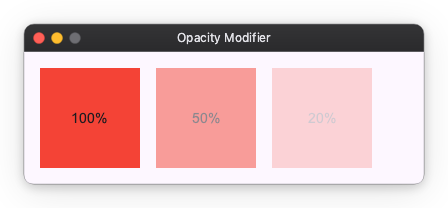
You can change the opacity of a Widget using the opacity modifier. It takes a value between 0.0 (transparent) and 1.0 (opaque).
import nuiitivet.material as nv

# 100% opacity
box1 = nv.Container(child=nv.Text("100%")).modifier(nv.background("#F44336"))

# 50% opacity
box2 = nv.Container(child=nv.Text("50%")).modifier(nv.background("#F44336") | nv.opacity(0.5))

# 20% opacity
box3 = nv.Container(child=nv.Text("20%")).modifier(nv.background("#F44336") | nv.opacity(0.2))
Rotate and Scale
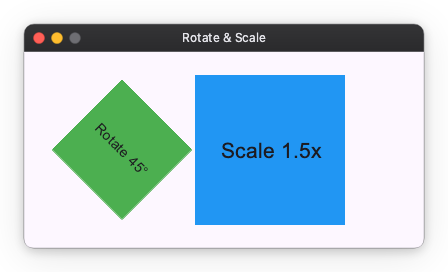
You can rotate a Widget using the rotate modifier and scale it using the scale modifier.
import nuiitivet.material as nv

# Rotate 45 degrees
box1 = nv.Container(child=nv.Text("Rotate 45°")).modifier(
    nv.background("#4CAF50") | nv.rotate(45)
)

# Scale 1.5x
box2 = nv.Container(child=nv.Text("Scale 1.5x")).modifier(
    nv.background("#2196F3") | nv.scale(1.5)
)
Translate
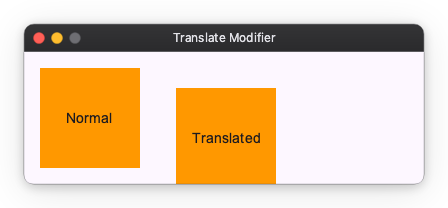
You can translate a Widget using the translate modifier. It takes an offset tuple (dx, dy).
import nuiitivet.material as nv

# Normal
box1 = nv.Container(child=nv.Text("Normal")).modifier(nv.background("#FF9800"))

# Translated
box2 = nv.Container(child=nv.Text("Translated")).modifier(
    nv.background("#FF9800") | nv.translate((20, 20))
)