Overlay
Overlay is the framework's system for displaying content above the main widget tree. It acts as a transparent full-screen layer that sits on top of all other widgets, allowing you to show dialogs, toasts, menus, and other transient UI elements without disturbing the underlying layout.
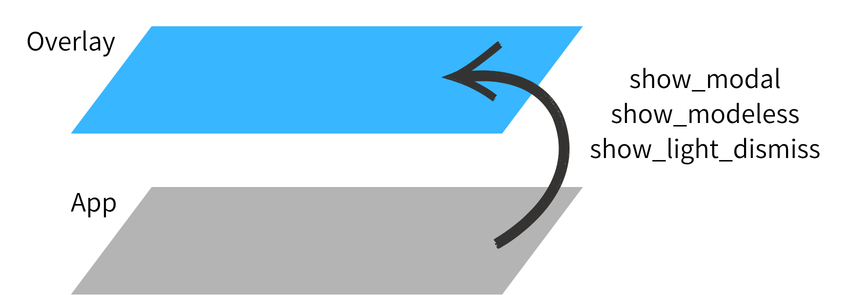
Role in the Widget Tree
App creates and mounts an Overlay at the root of the widget tree. Content pushed into the overlay is rendered above all other widgets, regardless of their position in the tree.
App
└── Overlay                  ← always on top
    ├── (overlay entries)    ← managed by Overlay.show()
    └── child                ← your main widget tree
Accessing Overlay
Use Overlay.of(self) from any mounted widget.
It returns the nearest ancestor Overlay, and falls back to the one your
window owns when there is no nested Overlay above you — which is the usual
case, since the window composes its overlay as a sibling layer of the
Navigator rather than as a wrapper around your screens. So a screen gets its
window's overlay, and a widget inside an intentionally nested Overlay gets
that inner one.
To reach the window's overlay from inside a nested one — to show something
above everything in that window — pass root=True:
Because the lookup walks the tree from self, it resolves against your App.
Two App instances in one process each get their own.
[!NOTE]
Overlay.of(self)cannot be called from a widget's__init__— a widget has no ancestors until it is mounted. Resolve it inon_mount(), inbuild(), or in the event handler that needs it.
The primitive
Overlay exposes one primitive, show(), parameterised by three independent flags:
| Flag | Concern | Effect |
|---|---|---|
passthrough |
Input | Whether the app behind the overlay stays usable |
dismiss_on_outside_tap |
Input | Whether a tap outside the content closes the overlay |
passthrough_rect |
Input | A rect the blocking layer leaves alone — a tap there reaches the app and never dismisses (how popup(anchor_passthrough=True) exempts its anchor) |
backdrop |
Appearance | Whether a backdrop is painted behind the content |
Common shapes fall out of the combinations:
| Shape | Call |
|---|---|
| Dialog | show(x, backdrop=True, dismiss_on_outside_tap=True) |
| Toast | show(x, passthrough=True, timeout=3.0) |
| Menu | show(x, dismiss_on_outside_tap=True) |
See Primitives for full documentation and usage examples.
Material Design
MaterialOverlay is a subclass that adds Material Design 3-specific shortcuts — dialog(), snackbar(), bottom_sheet(), side_sheet(), and loading(). For Material Design-specific usage, see Material Overlay.