Modifiers
Modifiers are a mechanism for adding functionality to Widgets. Use them when you want to add decorations like background color or corner radius to a Widget, or when you want to add interaction like clickability.
Basic Usage
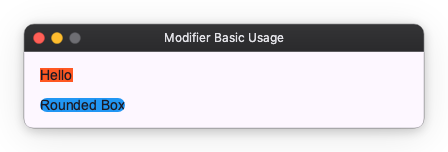
You can add functionality to a Widget by passing a Modifier to the modifier() method that all Widgets have. If you want to attach multiple Modifiers, you can chain them with the | operator.
from nuiitivet.material import Text
from nuiitivet.modifiers import background, corner_radius

# Add background color with background
text1 = Text("Hello").modifier(background("#FF5722"))

# Add corner radius with corner_radius
text2 = Text("Rounded Box").modifier(background("#2196F3") | corner_radius(8))
It's similar to Modifiers in SwiftUI or Jetpack Compose, but Nuiitivet does not provide layout-related functions in Modifiers. Layout should be handled by Widgets and parameters alone; allowing Modifiers to handle layout would make the code complex.
Types of Modifiers
Modifiers are categorized into the following types:
- Decoration: Add visual decorations like background, border, corner radius, clip, and shadow.
- Interaction: Add interaction capabilities like clickable, hoverable, and focusable.
- Transform: Apply paint-only transformations like opacity, rotate, scale, and translate.
- Others: Other functionalities like scrollable and will_pop.