Other Modifiers
Other modifiers provide additional functionalities to Widgets, such as scrollability and handling back navigation.
Scrollable
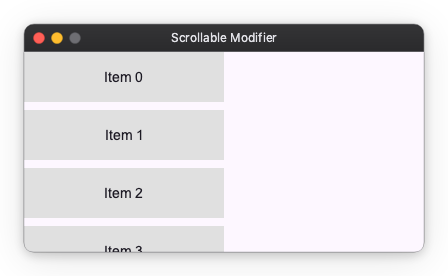
You can make a Widget scrollable using the scrollable modifier. It takes an axis parameter that specifies the scroll direction ("x", "y", or "both").
from nuiitivet.modifiers import background, scrollable

items = [
    Container(child=Text(f"Item {i}")).modifier(background("#E0E0E0"))
    for i in range(10)
]

# Scrollable list
content = Container(
    width=250,
    height=200,
    child=Column(children=items, gap=8),
).modifier(scrollable(axis="y"))
Will Pop
You can handle back navigation (e.g., pressing the Esc key) using the will_pop modifier. It takes an on_will_pop callback that returns a boolean indicating whether pop should be allowed.
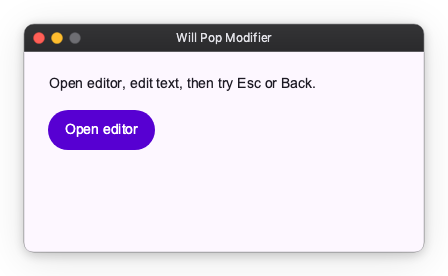
In this example, an editor screen is pushed on a Navigator. Pop is blocked while there are unsaved changes, and allowed after Save or Discard.
import nuiitivet as nv
import nuiitivet.material as md
from dataclasses import dataclass
from nuiitivet.material.buttons import Button
from nuiitivet.material.dialogs import AlertDialog
from nuiitivet.material import Overlay
from nuiitivet.material.text_fields import TextField
from nuiitivet.modifiers import will_pop
from nuiitivet.navigation import Navigator, PageRoute
from nuiitivet.observable import Observable
from nuiitivet.material import ButtonStyle

@dataclass(frozen=True, slots=True)
class HomeIntent:
    pass

class HomeScreen(nv.ComposableWidget):
    def build(self):
        def _open_editor() -> None:
            Navigator.root().push(PageRoute(builder=lambda: EditScreen()))

        return nv.Container(
            padding=24,
            child=nv.Column(
                children=[
                    md.Text("Will Pop Modifier"),
                    md.Text("Open editor, edit text, then try Esc or Back."),
                    Button("Open editor", on_click=_open_editor, style=ButtonStyle.filled()),
                ],
                gap=14,
                cross_alignment="start",
            ),
        )

class EditScreen(nv.ComposableWidget):
    def __init__(self) -> None:
        super().__init__()
        self.text = Observable("Hello")
        self._initial_text = str(self.text.value)

    def _is_dirty(self) -> bool:
        return str(self.text.value) != self._initial_text

    def _save(self) -> None:
        self._initial_text = str(self.text.value)

    def _try_pop(self) -> None:
        Navigator.root().pop()

    def _on_will_pop(self) -> bool:
        if not self._is_dirty():
            return True

        def _cancel() -> None:
            Overlay.root().close(None)

        def _discard() -> None:
            self._initial_text = str(self.text.value)
            Overlay.root().close(None)
            Navigator.root().pop()

        Overlay.root().dialog(
            AlertDialog(
                title="Discard changes?",
                message="You have unsaved changes.",
                actions=[
                    Button("Cancel", on_click=_cancel, style=ButtonStyle.text()),
                    Button("Discard", on_click=_discard, style=ButtonStyle.filled()),
                ],
            ),
            dismiss_on_outside_tap=False,
        )
        return False

    def build(self):
        return nv.Container(
            padding=24,
            child=nv.Column(
                children=[
                    md.Text("Edit text. Back/Esc asks confirmation when unsaved."),
                    TextField.two_way(
                        self.text,
                        width=420,
                        height=52,
                        padding=10,
                    ),
                    nv.Row(
                        children=[
                            Button("Back", on_click=self._try_pop, style=ButtonStyle.text()),
                            Button("Save", on_click=self._save, style=ButtonStyle.filled()),
                        ],
                        gap=10,
                    ),
                ],
                gap=14,
                cross_alignment="start",
            ),
        ).modifier(
            will_pop(on_will_pop=self._on_will_pop)
        )

def main() -> None:
    md.App(
        Navigator.intents(
            initial_route=HomeIntent(),
            routes={HomeIntent: lambda _i: PageRoute(builder=HomeScreen)},
        ),
    ).run()