Nested Navigation with MaterialNavigator
While Navigator.root() is useful for full-screen transitions, you might sometimes need to navigate within a specific part of your screen, such as inside a tab or a split pane. This is known as nested navigation.
Using MaterialNavigator
You can create a nested navigation area by placing a MaterialNavigator widget anywhere in your widget tree. You can initialize it with a single initial screen.
import nuiitivet as nv

from nuiitivet.material import Text, Button
from nuiitivet.material.navigator import MaterialNavigator
from nuiitivet.layout.column import Column
from nuiitivet.layout.row import Row
from nuiitivet.layout.container import Container
from nuiitivet.navigation import Navigator, PageRoute
from nuiitivet.widgeting.widget import ComposableWidget
from nuiitivet.widgets.box import Box
from nuiitivet.material import ButtonStyle

class NestedHome(ComposableWidget):
    def build(self):
        return Column(
            padding=16,
            gap=12,
            children=[
                Text("Nested Home"),
                Button("Go Deeper (Nested)", on_click=lambda: Navigator.of(self).push(NestedDetails()), style=ButtonStyle.filled()),
            ],
        )

class NestedDetails(ComposableWidget):
    def build(self):
        return Box(
            background_color="#F5F7FF",
            width=nv.Sizing.flex(1),
            height=nv.Sizing.flex(1),
            child=Column(
                padding=16,
                gap=12,
                children=[
                    Text("Nested Details"),
                    Button("Back (Nested)", on_click=lambda: Navigator.of(self).pop(), style=ButtonStyle.filled()),
                ],
            ),
        )

class FullScreenDetails(ComposableWidget):
    def build(self):
        return Box(
            background_color="#EEF7F0",
            width=nv.Sizing.flex(1),
            height=nv.Sizing.flex(1),
            child=Column(
                padding=20,
                gap=12,
                children=[
                    Text("Full Screen Details"),
                    Button("Back (Full Screen)", on_click=lambda: Navigator.root().pop(), style=ButtonStyle.filled()),
                ],
            ),
        )

class MainScreen(ComposableWidget):
    def build(self):
        return Row(
            width=nv.Sizing.flex(1),
            height=nv.Sizing.flex(1),
            gap=12,
            padding=12,
            children=[
                # Left side: Static menu
                Container(
                    width=200,
                    height=nv.Sizing.flex(1),
                    child=Column(
                        padding=12,
                        gap=10,
                        children=[
                            Text("Sidebar Menu"),
                            Button("Open Full Screen", on_click=lambda: Navigator.root().push(FullScreenDetails()), style=ButtonStyle.filled()),
                        ],
                    ),
                ),
                # Right side: Nested Navigator
                Container(
                    width=nv.Sizing.flex(1),
                    height=nv.Sizing.flex(1),
                    child=MaterialNavigator(
                        routes=[PageRoute(builder=lambda: NestedHome())]
                    ),
                ),
            ],
        )
Navigating within a Nested Navigator
To navigate within a nested navigator, you use Navigator.of(context) instead of Navigator.root(). This method searches up the widget tree from the given context to find the nearest Navigator.
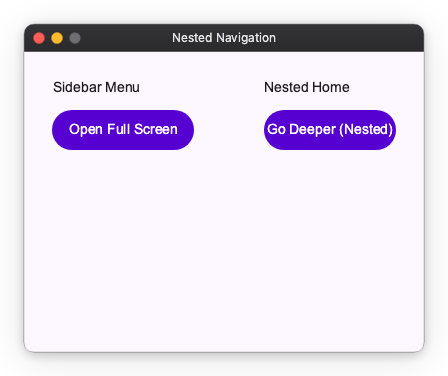
In the example above:
- The "Open Full Screen" button uses
Navigator.root().push()to replace the entireMainScreen. - The "Go Deeper (Nested)" button uses
Navigator.of(self).push()to change only the right side of the screen, leaving the sidebar intact.
By using MaterialNavigator and Navigator.of(), you can create complex, multi-layered navigation structures within your application, allowing for independent navigation flows in different sections of the UI.