Material App
Material App is the entry point for a Material Design application. It sets up Material Theme, Overlay, and Navigator with sensible defaults so you can focus on building your UI.
Basic Usage
import nuiitivet as nv
from nuiitivet.material import App, Button, Text
from nuiitivet.material.styles.button_style import ButtonStyle
from nuiitivet.layout.column import Column
from nuiitivet.layout.container import Container
from nuiitivet.widgeting.widget import ComposableWidget, Widget


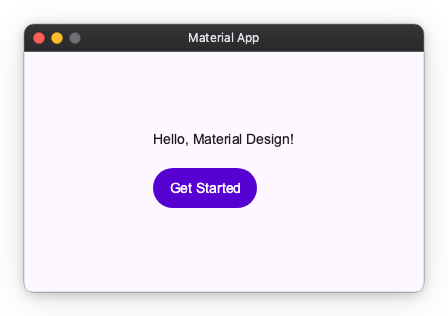
class HomeScreen(ComposableWidget):
    def build(self) -> Widget:
        return Container(
            alignment="center",
            width="100%",
            height="100%",
            child=Column(
                gap=16,
                children=[
                    Text("Hello, Material Design!"),
                    Button("Get Started", style=ButtonStyle.filled()),
                ],
            ),
        )


App(HomeScreen(), title_bar=nv.DefaultTitleBar(title="Material App")).run()
Window
Control the window size, position, and resize behavior:
from nuiitivet.runtime.window import WindowPosition

App(
    HomeScreen(),
    width=1280,
    height=800,
    window_position=WindowPosition("center"),
    resizable=False,
).run()
See Window for detailed usage.
Title Bar
Default Title Bar
Custom Title Bar
Replace the OS title bar with any widget:
import nuiitivet as nv
from nuiitivet.material import Text

App(
    HomeScreen(),
    title_bar=nv.CustomTitleBar(
        content=Text("My App"),
        title="My App",
    ),
).run()
See Window Chrome for detailed usage.
Theme
Pass a ThemeFactory to change the seed color or switch to dark mode:
from nuiitivet.material import App, ThemeFactory

App(HomeScreen(), theme=ThemeFactory.dark("#00639B")).run()
See Material Theme for detailed usage.
Overlay Routes
Register custom overlay intents that can be dispatched from anywhere in the widget tree:
from nuiitivet.material import App
from nuiitivet.material.dialogs import BasicDialog

App(
    HomeScreen(),
    overlay_routes={
        MyIntent: lambda intent: BasicDialog(title=intent.title, message=intent.message),
    },
).run()
See Material Overlay for detailed usage.