Window Chrome
Window chrome refers to the decoration around your application window — the title bar, border, and window controls provided by the OS or drawn by the app itself. Nuiitivet lets you choose from three modes via the chrome= parameter on App:
| Value | Description |
|---|---|
OSChrome(variant=...) |
OS-managed chrome (default) |
CustomChrome(header=...) |
App-drawn header, borderless OS window |
None |
No chrome — bare borderless window |
OS-managed chrome (OSChrome)
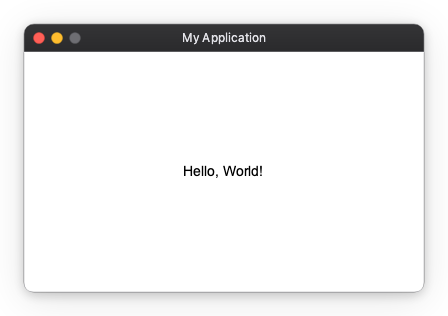
When chrome= is omitted, OSChrome() is used automatically. The OS draws the standard title bar, including window controls (close / minimise / maximise).
Use the title= parameter to set the text shown in the OS title bar. It accepts a plain string, an Observable[str | None] for reactive updates, or None for no title.
from nuiitivet.runtime.app import App
from nuiitivet.material import Text
from nuiitivet.layout.container import Container

app = App(
    content=Container(
        alignment="center",
        width="100%",
        height="100%",
        child=Text("Hello, World!"),
    ),
    title="My Application",
    width=400,
    height=240,
)
app.run()
Variants
Pass variant= to OSChrome to request a different OS window style:
| Variant | Description |
|---|---|
"default" |
Standard window (minimize / maximize / close) |
"dialog" |
No minimize or maximize button |
"tool" |
Small title bar |
"borderless" |
No OS decoration (title bar drawn by OS is hidden) |
"transparent" |
Transparent background |
See OSChrome for the full API reference.
Custom chrome (CustomChrome)
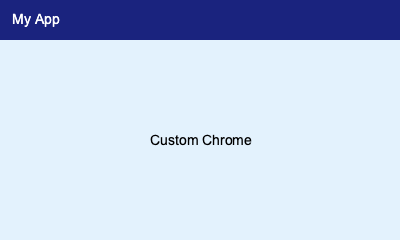
CustomChrome removes the OS title bar and lets you render any widget as the window header. Nuiitivet automatically wraps the header widget in WindowDragArea so the user can drag the window by clicking and dragging the header.
The title= parameter still controls the OS taskbar / Alt-Tab label even with CustomChrome. It accepts a plain string or an Observable[str | None] for reactive updates. The visual title text inside the window is entirely up to your header widget.
import nuiitivet as nv
from nuiitivet.runtime.app import App
from nuiitivet.material import Text
from nuiitivet.material.styles.text_style import TextStyle
from nuiitivet.layout.container import Container
from nuiitivet.layout.row import Row
from nuiitivet.modifiers import background

header = Row(
    children=[
        Text("My App", style=TextStyle(color="#ffffff", font_size=14)),
    ],
    cross_alignment="center",
    width="100%",
    height=40,
    padding=(12, 0),
).modifier(background("#1a237e"))

app = App(
    content=Container(
        alignment="center",
        width="100%",
        height="100%",
        child=Text("Custom Chrome"),
    ),
    title="My App",
    chrome=nv.CustomChrome(
        header=header,
        corner_radius=8,
    ),
    width=400,
    height=240,
)
app.run()
See CustomChrome for the full API reference.
No chrome (chrome=None)
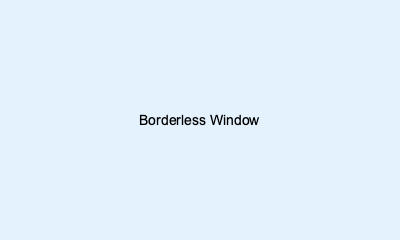
Pass chrome=None for a completely bare borderless window with no OS decoration and no app-drawn header.
from nuiitivet.runtime.app import App
from nuiitivet.material import Text
from nuiitivet.layout.container import Container

app = App(
    content=Container(
        alignment="center",
        width="100%",
        height="100%",
        child=Text("Borderless Window"),
    ),
    title="Borderless",
    chrome=None,
    width=400,
    height=240,
)
app.run()