Material App
nv.App(nv.Window(content=...)) is the entry point for a Material Design application: the Window sets up the Material Overlay and Navigator, and the App supplies the Material Theme — all with sensible defaults so you can focus on building your UI.
Basic Usage
import nuiitivet.material as nv


class HomeScreen(nv.ComposableWidget):
    def build(self) -> nv.Widget:
        return nv.Container(
            alignment="center",
            width="wt",
            height="wt",
            child=nv.Column(
                gap=16,
                children=[
                    nv.Text("Hello, Material Design!"),
                    nv.Button("Get Started", style=nv.ButtonStyle.filled()),
                ],
            ),
        )


nv.App(nv.Window(content=HomeScreen, title="Material App")).run()
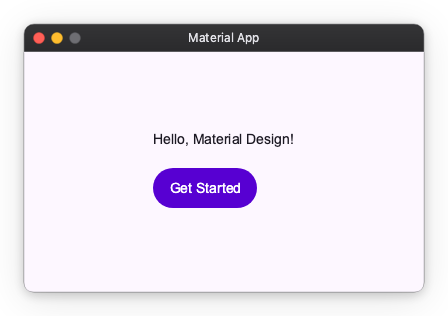
Window
Control the window size, position, and resize behavior:
import nuiitivet.material as nv

nv.App(
    nv.Window(
        content=HomeScreen,
        width=1280,
        height=800,
        window_position="center",
        resizable=False,
    ),
).run()
See Window for detailed usage.
Window Chrome
By default Window uses OS-managed chrome (OSChrome), which draws the standard OS title bar. Set its text with the title= parameter:
Custom Chrome
Replace the OS title bar with your own header widget via chrome=CustomChrome(...). Nuiitivet wraps the header in a drag area so the window can still be moved by dragging it:
import nuiitivet.material as nv

header = nv.Row(
    children=[nv.Text("My App")],
    cross_alignment="center",
    width="wt",
    height=40,
    padding=(12, 0),
).modifier(nv.background("#1a237e"))

nv.App(
    nv.Window(
        content=HomeScreen,
        title="My App",
        chrome=nv.CustomChrome(header=header, corner_radius=8),
    ),
).run()
See Window Chrome for detailed usage.
Theme
Pass a ThemeFactory to change the seed color or switch to dark mode:
import nuiitivet.material as nv

nv.App(nv.Window(content=HomeScreen), theme=nv.ThemeFactory.dark("#00639B")).run()
See Material Theme for detailed usage.
Overlay Intents
Register custom overlay intents on the window's overlay. They can be dispatched from anywhere in the widget tree:
import nuiitivet.material as nv


def build_overlay() -> nv.Overlay:
    return nv.Overlay(
        intents={
            MyIntent: lambda intent: nv.BasicDialog(title=intent.title, message=intent.message),
        },
    )


nv.App(nv.Window(content=HomeScreen, overlay=build_overlay)).run()
See Material Overlay for detailed usage.