The intuitive grammar
Nuiitivet keeps the parts of other frameworks that were already intuitive, so most of it reads like something you know. This page builds one small card, a few lines at a time.
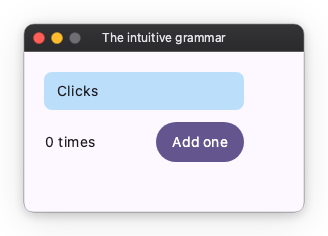
Lay out with a widget tree and parameters
import nuiitivet.material as nv

nv.Column(
    [
        nv.Text("Clicks"),
        nv.Button("Add one"),
    ],
    gap=12,
    padding=20,
)
A screen is a tree of widgets, as in Flutter. Spacing and sizes are
parameters: padding, gap, size(width, height). Those parameters
are all that decides the layout.
In Flutter, a padding and a width are widgets wrapped around the text, so the nesting grows with every decoration:
// Flutter — not Nuiitivet
Padding(
  padding: EdgeInsets.all(12),
  child: SizedBox(
    width: 200,
    child: Text("Clicks"),
  ),
)
Here they are parameters of the widget itself:
A size is a number, "auto" (fit the content), or "wt" — a share of the
space that is left, what WPF writes as *. The count below takes the leftover
and pushes the button to the right edge:
nv.Row(
    [
        nv.Text("0 times", width="wt"),
        nv.Button("Add one"),
    ],
    gap=12,
    width=200,
    cross_alignment="center",
)
There is no margin. Spacing is padding and gap only — the habit CSS
authors settle into, made the rule. And every pair is horizontal first, then
vertical: padding=(16, 8) is 16 left and right, as alignment and
translate are x before y.
Layout has the rest, including Grid: tracks sized as in
WPF, cells placed by area name as in CSS.
Add everything else with modifiers
What is not layout — a background, rounded corners, a tooltip, a click — is
attached as a modifier. Modifiers chain with |, the way they chain in
SwiftUI and Compose:
So the code itself tells the two apart: the parameters are the layout, the modifier chain is everything else. Modifiers lists them.
Show state by binding it
Observable is modelled on ReactiveProperty, from WPF's MVVM. Hand the
Observable to the widget and the widget follows it; there is no setState
and nothing to refresh by hand. Observable covers
deriving values and the Rx-style operators.
Handle events with ordinary code
def handle_add(self) -> None:
    self.count.value += 1
    if self.count.value % 10 == 0:
        print("Milestone reached!")
What the screen shows is declared: the tree, and the values bound into it. What happens on a click is a different kind of thing — read a value, change it, branch on the result. That is a procedure. Forced into a declarative shape it only gets harder to follow, so a handler is an ordinary method, written top to bottom, the way you would say it aloud.
The whole card
import nuiitivet.material as nv


class CounterCard(nv.ComposableWidget):
    def __init__(self) -> None:
        super().__init__()
        self.count = nv.Observable(0)

    def handle_add(self) -> None:
        self.count.value += 1
        if self.count.value % 10 == 0:
            print("Milestone reached!")

    def build(self) -> nv.Widget:
        return nv.Column(
            [
                nv.Text("Clicks", padding=12, width=200).modifier(nv.background("#BBDEFB") | nv.corner_radius(8)),
                nv.Row(
                    [
                        nv.Text(self.count.map(lambda n: f"{n} times"), width="wt"),
                        nv.Button("Add one", on_click=self.handle_add),
                    ],
                    gap=12,
                    width=200,
                    cross_alignment="center",
                ),
            ],
            gap=12,
            padding=20,
        )


def build_root() -> nv.Widget:
    return CounterCard()


nv.App(nv.Window(content=build_root)).run()