Decoration Modifiers
Decoration modifiers are used to add visual styling to Widgets, such as background colors, borders, corner radii, clipping, and shadows.
Background and Border
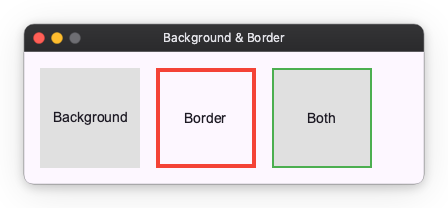
You can add a background color using the background modifier and a border using the border modifier.
import nuiitivet.material as nv

# Background only
box1 = nv.Container(child=nv.Text("Background")).modifier(nv.background("#E0E0E0"))

# Border only
box2 = nv.Container(child=nv.Text("Border")).modifier(nv.border(color="#F44336", width=4))

# Both background and border
box3 = nv.Container(child=nv.Text("Both")).modifier(
    nv.background("#E0E0E0") | nv.border(color="#4CAF50", width=2)
)
Corner Radius and Clip
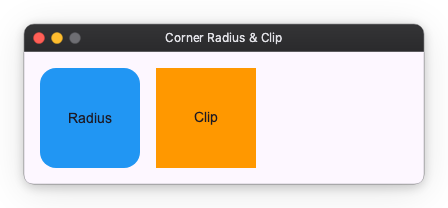
You can round the corners of a Widget using the corner_radius modifier. If you want to clip the content of the Widget to its bounds, use the clip modifier.
import nuiitivet.material as nv

# Corner radius
box1 = nv.Container(child=nv.Text("Radius")).modifier(
    nv.background("#2196F3") | nv.corner_radius(16)
)

# Clip content
box2 = nv.Container(child=nv.Text("Clip")).modifier(
    nv.background("#FF9800") | nv.clip()
)
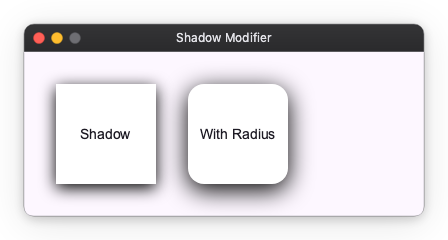
Shadow
You can add a drop shadow to a Widget using the shadows modifier. It takes a Shadow value, a list of them ordered back to front, or None for no shadow.
A Shadow describes one layer in CSS box-shadow terms:
color: the shadow colorblur_radius: the CSS blur-radius in pixels;0gives a hard-edged shadowoffset:(dx, dy)translation of the shadowspread_radius: outward inflation of the shadow rect in pixels, applied before the blur; a negative value shrinks it
import nuiitivet.material as nv

# Simple shadow
box1 = nv.Container(child=nv.Text("Shadow")).modifier(
    nv.background("#FFFFFF") | nv.shadows(nv.Shadow("#000000", blur_radius=16, offset=(0, 4)))
)

# Shadow with corner radius
box2 = nv.Container(child=nv.Text("With Radius")).modifier(
    nv.background("#FFFFFF")
    | nv.corner_radius(16)
    | nv.shadows(nv.Shadow("#000000", blur_radius=24, offset=(0, 6)))
)

# A stack: a wide, soft ambient layer under a tight key layer
box3 = nv.Container(child=nv.Text("Stack")).modifier(
    nv.background("#FFFFFF")
    | nv.shadows(
        [
            nv.Shadow(("#000000", 0.15), blur_radius=8, offset=(0, 4), spread_radius=3),
            nv.Shadow(("#000000", 0.30), blur_radius=3, offset=(0, 1)),
        ]
    )
)